Collaboration
Three parties on one project — no mismatched numbers
A mine usually has three parties: the licence holder, the management company and the contractor. In PrimeX every company has its own space, and on a joint project only the data you have shared is exchanged.
Licence holder
Extraction, stockpile and quality data from the field are confirmed by measurement and viewed.
- Survey measurements, layers
- Stockpile and quality reports
- Rehabilitation — every area’s stage, monitoring
- HSE monthly report, laboratory results
Management (mine owner)
Plans, budget and performance are monitored from one dashboard, and the contractor’s work is confirmed by act.
- Monthly and daily plan versus performance
- Contractor performance monitoring
- Approving acts, receiving invoices
- Complete financial records and reports
Contractor
Record your own equipment, roster and trips, and send acts to the owner electronically. Pay and rental settlements automatic.
- Own roster, equipment, drivers
- Dispatcher records from the phone
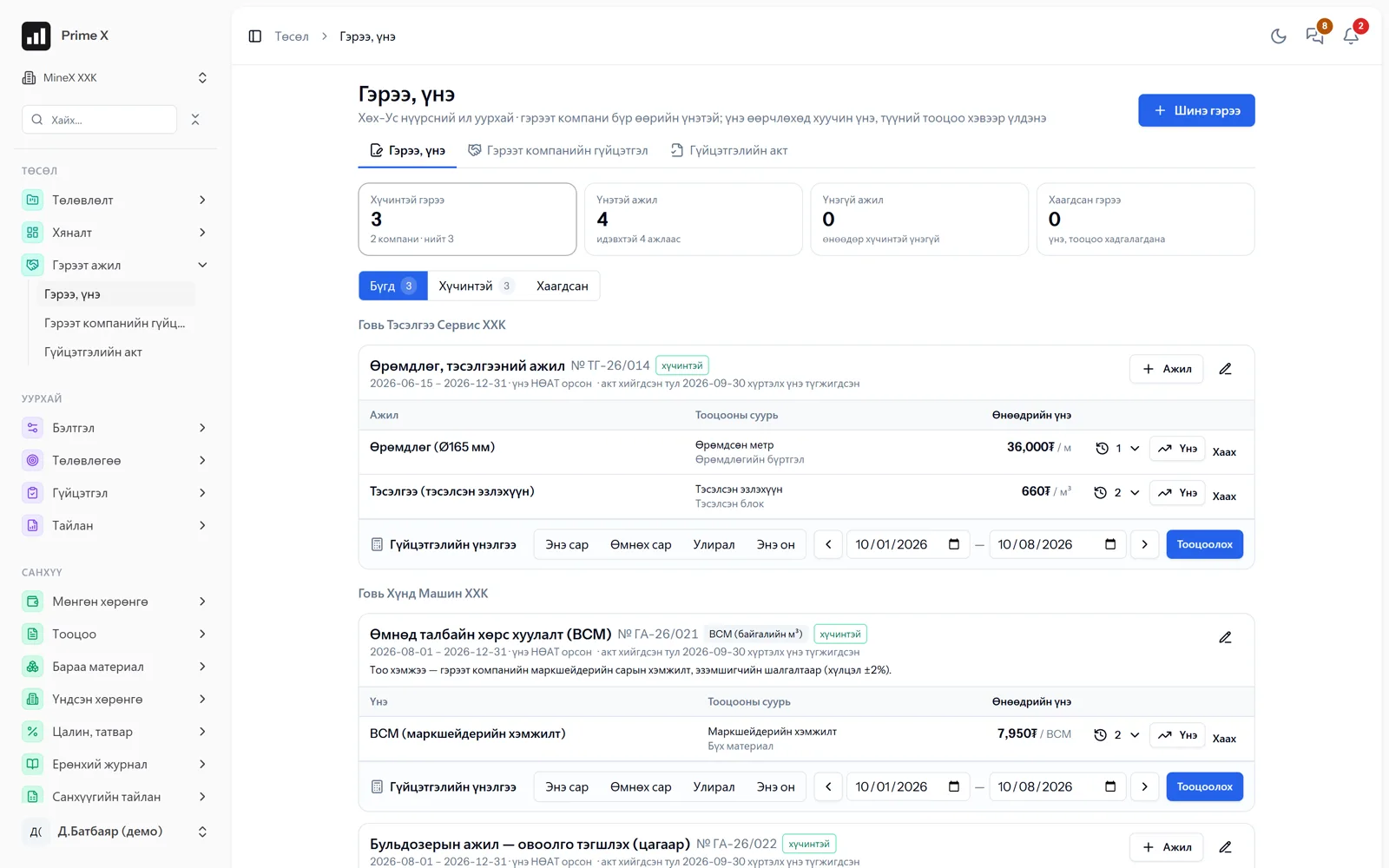
- Acts and invoices at contract rates
- Piecework pay, payroll
One set of numbers — for both sides
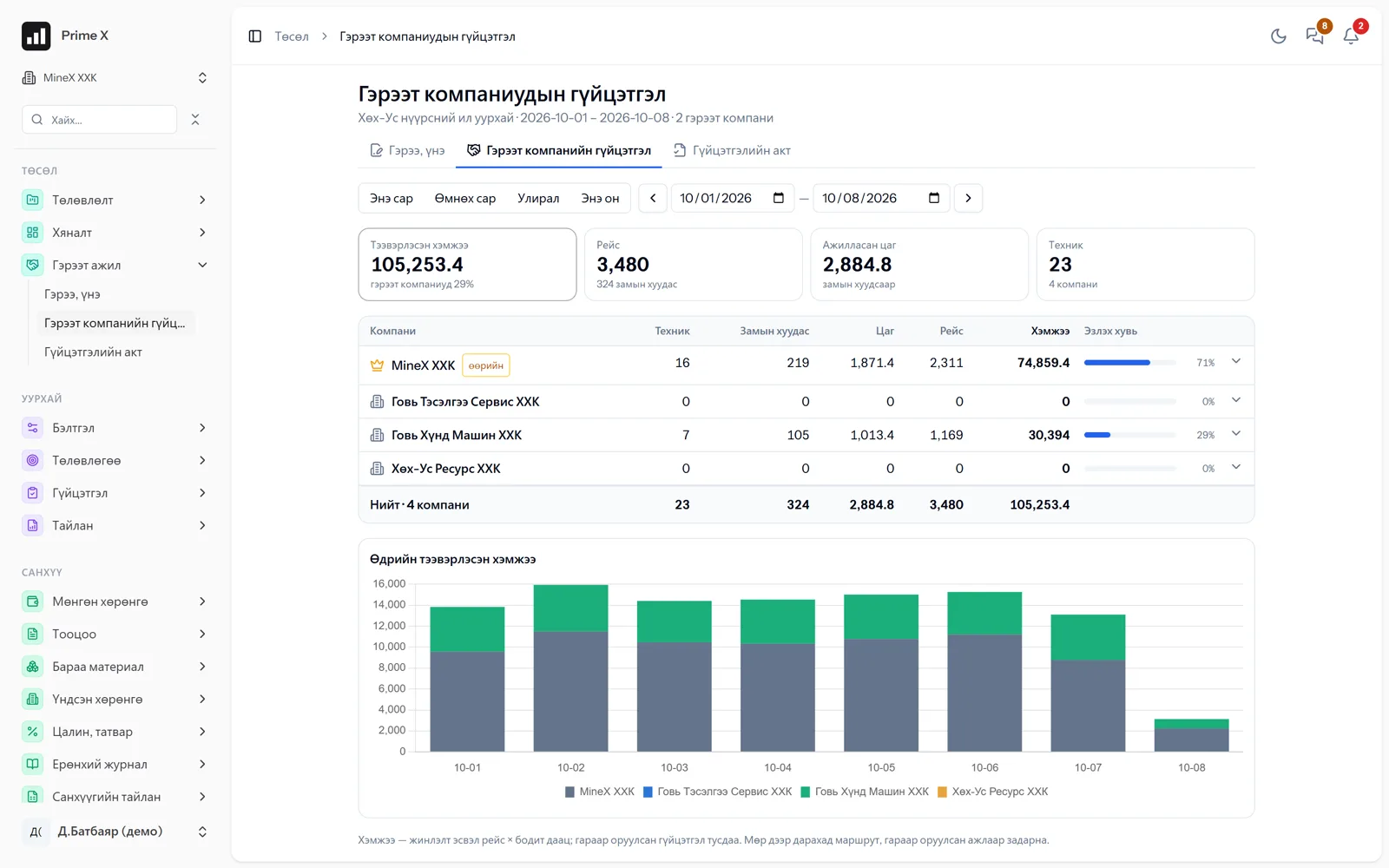
Every contractor’s trips, quantities and acts on one screen
Because own and contractor equipment are recorded in one dispatcher, every contractor’s waybills, hours, trips and hauled quantities appear side by side. Acts are calculated at contract rates, and a receivable is posted on one side and a payable on the other.
Who sees what
Access to information on a joint project
Even on one project, no company shares its finance, payroll or employee data with anyone. Only the joint work figures — trips, measurements, acts — are the same on both sides.
| Information | Licence holder | Management | Contractor |
|---|---|---|---|
| Project plan, schedule | Views | Edits | Own section |
| Roster, equipment | — | Own | Own |
| Dispatcher, trips | Consolidation | All | Own machines |
| Survey measurements | Edits | Edits, reconciles | Own measurements, reconciles |
| Performance act | Views | Approves | Creates, sends |
| Invoices, payments | — | Payables | Receivables |
| Finance, payroll, HR | Own | Own | Own |
How to join
The contractor joins by project invitation
The management company creates the project and invites the contractor. When the contractor accepts, it adds its own roster, equipment and drivers to that project and starts keeping its dispatcher records. A person working in both companies switches with one login.
-
1
Create the project
Management: budget, schedule, contract rates.
-
2
Invite the contractor
Accepting the invitation opens access to that project.
-
3
Mixed roster
Own and contractor equipment on one shift sheet.
-
4
Measurement reconciliation
Both sides’ survey measurements are shown with their differences.
-
5
Act → Invoice
The contractor creates and sends the act, management approves. A receivable on one side, a payable on the other.
Better in real life
Screenshots show only a small part of the system
A screenshot shows just one moment. On the real system, when the dispatcher changes a status you see the trip report change, the act appear and the ledger entry go in. The best way is 30 minutes together on your company’s data.
- With your equipment, employees and project names
- Questions answered on the spot and shown on screen
- Online or at your office
- No obligation, no charge
See it on the real system
Request a walkthrough Try the dispatcherThere is no open demo. Walkthroughs are done only at your request, for your company.
Ready to run your company on one system?
Screenshots do not fully show how it works in practice. We give a 30-minute walkthrough on your company’s data and draw up an implementation plan together — office, factory, clinic, road or mine, the whole system or a single module. If you have foreign investors we show the English and Chinese interfaces too.